KeyBloom
The moment your playing blooms
Particles bloom from the key you press — file or live.
Particles bloom from the key you press
The instant you touch a key, light rises from that key. A native audio engine bypasses the browser, so it feels like playing — and your take renders straight to video.
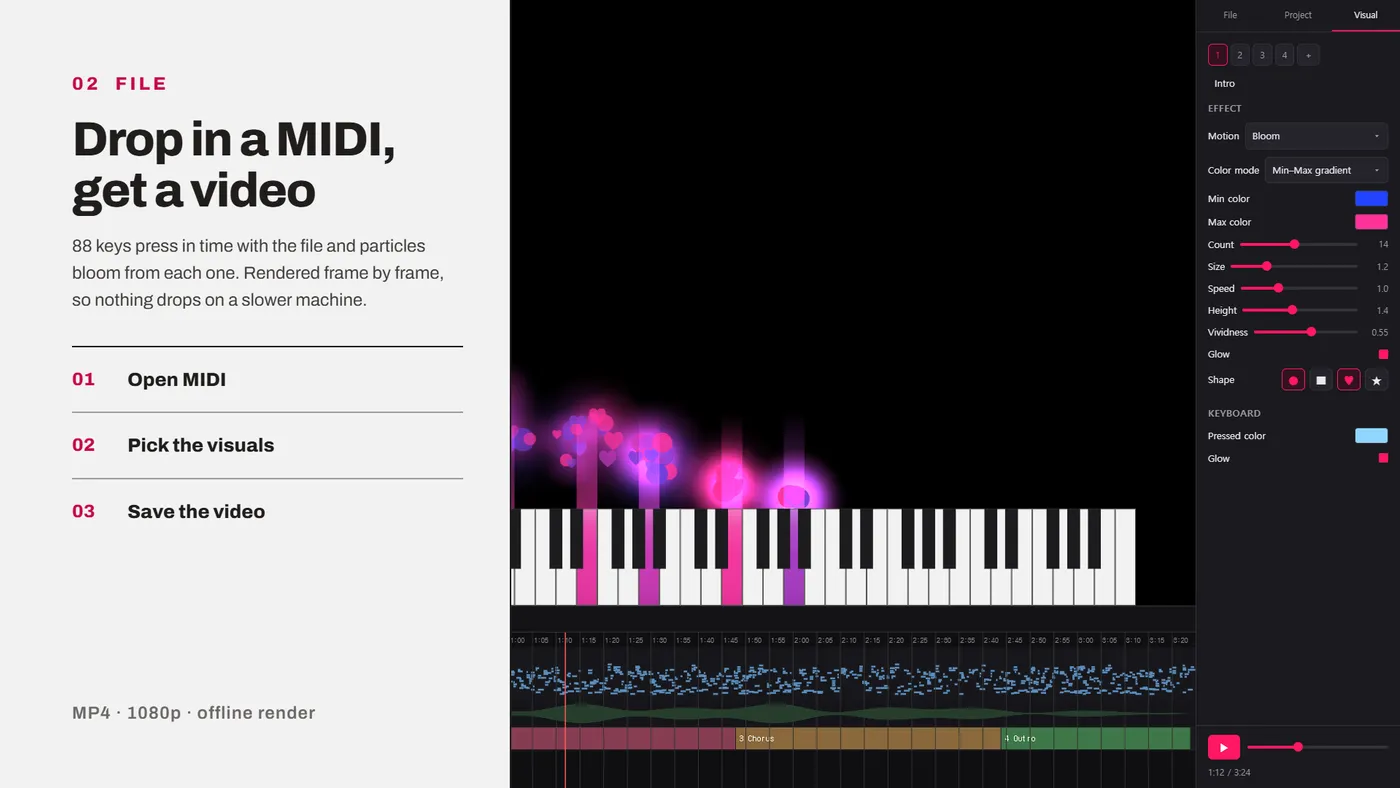
Drop in a MIDI, get a video
88 keys press in time with the file and particles bloom from each one. Rendered frame by frame, so nothing drops on a slower machine.
Seven motions, five color modes
Shape (●■♥★), color, count, size, speed, height, glow and velocity response — set once as a global rule for the whole piece. No note-by-note keyframing.
A different look per section
Build up to six cues and drop them on the timeline — the visuals change from that point on, while particles already in the air keep their old color.
MIDI · audio waveform · visual track — on one screen
Made with KeyBloom
Performance and demo videos from the official channel.
No watermark, alpha included
MIDI files in the browser, live playing in the app. PLUS is app-only — Windows.
Get KeyBloom
The web and desktop app are free. PLUS is a one-time purchase — after checkout you receive a license key by email; paste it into the KeyBloom app to unlock. One license covers up to two devices.
Payment is handled by Creem as the merchant of record.
Refunds — as this is digital content, the purchase is refundable within 14 days if the license key has not been activated, and non-refundable after activation.Terms of Service
Launch sale — 30% off with codeKEYBLOOM· click "Add discount code" at checkout and enter it.
The app button downloads the setup file directly — run it to install. If Windows SmartScreen shows an "unknown publisher" warning, click More info → Run anyway. It is a standard warning for indie apps that are not code-signed yet.
Changelog
- 0.1.8
The keyboard gets more depth, and exported videos no longer look glitched in some video editors.
Changed
- The keyboard looks closer to a real piano: rounded bottom corners, small gaps between the white keys, and shading and shadows on the black keys.
Fixed
- Fixed videos exported from the app looking glitched in some video editors.
- 0.1.7
A new "Wave" particle motion, velocity response, and a performance pass so frames hold up during a performance.
New
- Wave — notes send out a ring that spreads like a drop on water. Playing the same note again pushes the earlier ring further out.
- Velocity response — how hard you play changes particle size, count and brightness. Set it to 0 to keep them constant.
- Particle count can now go up to 100.
Changed
- "Rise & Scatter" is now the Scatter slider on "Bloom". Max scatter gives you the old Rise & Scatter, and everything in between is available too. Existing project files are migrated when opened.
Improved
- General performance work so frames hold up during a performance. When your machine struggles it adjusts automatically in ways you are unlikely to notice, and you can turn this off under Playback settings.
- Refined the particle motions throughout.
Fixed
- The background image now shows in the performance output window.
- 0.1.6
Fixed an issue where the plus license could occasionally deactivate after an update.
- 0.1.5
Improved the particle width and height controls. Radial Bloom's shape is redesigned into an upper semicircle dome. At minimum width, particles gather to just the pressed key's width.
- 0.1.4
Live performance
- Press Space to step through your cues (scenes) in order
- Left Shift now works as a sustain pedal (when playing on the computer keyboard)
Other
- Rebalanced the demo piece (Chopin Nocturne) between the left and right hand
- Auto-update now shows download and install progress
- Browser shortcuts like refresh and dev tools no longer fire inside the desktop app
- 0.1.3
Opening files
- Double-click a .kbloom file to open the project directly
- If the app is already running, double-clicking another .kbloom asks whether to open it in the current window or a new one
Export
- Prevents clipping (distortion) when exporting loud, fully-mastered audio to video
Other
- The plus purchase button now also shows on the web
- 0.1.2
- .kbloom files now show a custom icon in the file explorer
- Changed the default color to a soft pink
- The About screen now shows the current version
- Fixed the auto-update prompt not appearing
- 0.1.0
KeyBloom — first release 🌸
A music visualizer where particles bloom from the keys as your MIDI plays.
- Load a MIDI and watch particles and keys move with the performance
- Style each cue (scene) with its own particle shape, color, and motion; switch cues per section with the sequencer track
- Add audio and export to video (MP4)
- Live mode — play in real time with a MIDI keyboard or your computer keyboard
- Save/open projects (.kbloom)
- Free on web and desktop; advanced export with plus